 Takealot Seller Connector
Connect your Takealot seller account
One straightforward monthly subscription for South African Takealot sellers.
R49 / month
All nine Takealot tools included. No setup fee. Cancel anytime.
You'll see the secure Stripe payment screen after email verification.
Get your Takealot API key
Open your Takealot Seller Portal to find or generate the API key you'll use to connect your account.
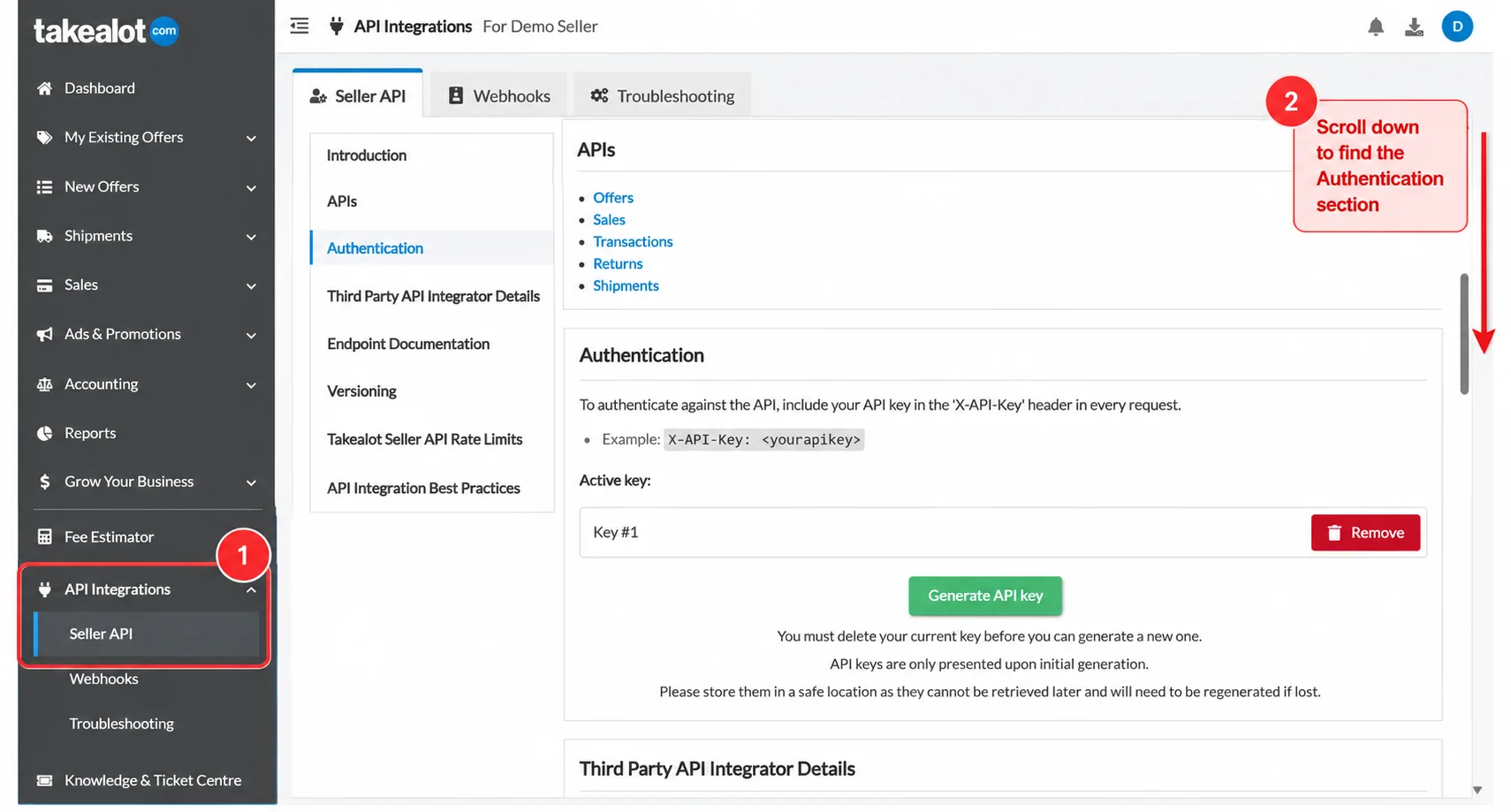
- Open Seller API settings using the button below.
- In the left navigation, select API Integrations → Seller API if you're not already there.
- Scroll down to the Authentication section.
- If you already have your API key saved, use that key. If you don't have one, click Generate API key and copy it immediately.
Verify your email
We'll email you a one-time code to identify your seller account.
R49 per month · Secure Stripe Checkout
Connect your seller account
Paste the API key you saved or just generated. We'll verify it against Takealot and securely encrypt it for your account.
Takealot API key connected
Your key is stored securely. To replace it, delete the existing key first.
🔒 Your API key will be encrypted and stored securely.
Seller account connected
Your Takealot API key has been verified and saved securely.
Your account is ready. Continue the connection in your AI assistant.
If your assistant is already open in another tab, you can switch back to it.